Skillera
An AI-powered LMS with adaptive HLS video, AI-generated quizzes and notes, and a grounded RAG tutor whose citations seek the video to the exact second.
Skillera
Skillera is a full-stack, AI-powered Learning Management System where instructors build and publish courses with video, text, quizzes, and assignments - and learners enroll, track progress, and earn verifiable completion certificates. Its headline feature is a grounded RAG Course Companion: an AI tutor that only answers from each course's own video transcripts, with clickable citations that seek the video player to the exact second the answer came from.
Under the hood, it's built around patterns I care about: a grounded retrieval pipeline, adaptive video transcoding, background job queues, role-based access, and a clean monorepo that keeps shared logic in one place.
Skillera is built on top of build-elevate, my own production-grade full-stack starter - so it doubles as that starter's flagship real-world application.
The Problem
Building an LMS sounds deceptively simple - courses have lessons, lessons have content, users enroll and track progress. But the moment you add video, the complexity multiplies fast. Raw uploads need to be transcoded. Multiple bitrates need to be served adaptively. Playback needs to feel smooth across network conditions.
Then there's the AI question. Most "AI on your course" features bolt a generic LLM onto a sidebar and let it hallucinate - useless for actually learning. Skillera's angle is a grounded tutor: the Course Companion can only answer from the course's own transcripts, and every answer carries citations that jump the video to the exact moment the answer came from. Trust is made visible and verifiable - and grounding is enforced at the data layer (course-scoped retrieval) and the access layer (enrollment-gated), so the companion can only pull from videos a learner is actually enrolled in.
On top of that: payments need to be reliable, instructor content needs review before it goes live, and the whole system needs to handle abuse at scale. None of these are hard in isolation. Getting them to work together without turning the codebase into a mess - that's the interesting part.
Core Features
AI Course Companion
- Grounded RAG chat over each course's own video transcripts (Vercel AI SDK v6)
- Ingestion: Whisper transcription → chunking → pgvector embeddings (OpenAI
text-embedding-3-small) - Enrollment-gated, streaming
POST /api/chatwith selectable OpenAI or Claude models - Clickable, timestamped source citations that seek the video player via a
?t=deep-link
Learning Management
- Course creation and management with full instructor tooling
- Lesson types across video, text, quiz, and assignment formats
- AI-assisted quiz generation from lesson transcripts and text content
- AI-generated notes from lesson content
- Per-user progress tracking and enrollment management
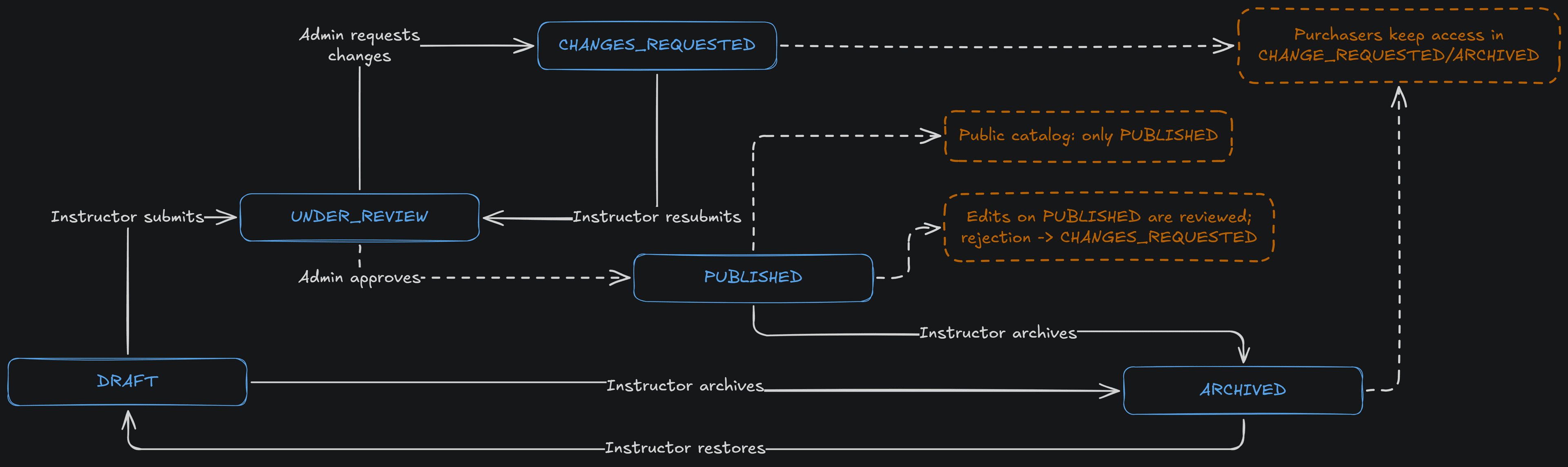
- Course review and approval workflow with change requests before publication
Video Processing & Streaming
- Presigned Cloudflare R2 uploads - files go straight to storage, not through the API server
- BullMQ + Redis background job queue for async transcoding
- FFmpeg adaptive bitrate transcoding to HLS at 360p, 720p, and 1080p
- Custom HLS.js player with quality and speed controls
- Auto-generated closed captions (WebVTT) derived from the same transcripts that power RAG
Payments & Monetization
- Razorpay checkout integration
- Coupon and discount system with multi-scope support
- Multi-currency pricing
Administration & Security
- Better Auth authentication with role-based access control
- Rate limiting and abuse protection
- Instructor application management ("apply to teach" → admin approval)
- Course review and approval workflow
Certificates & Notifications
- Course completion certificates with public verification links
- Transactional emails via Resend for enrollments and course events
Architecture
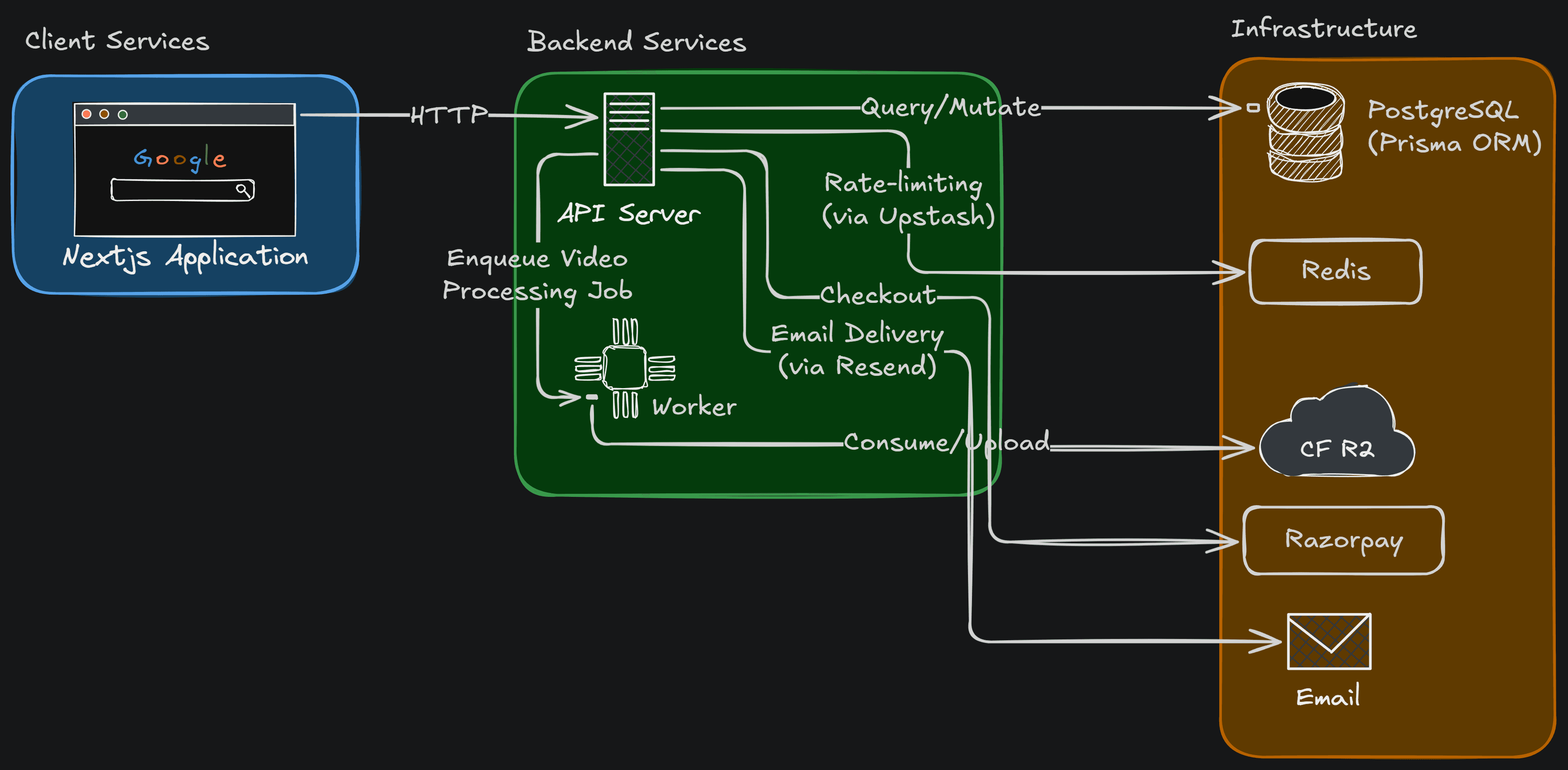
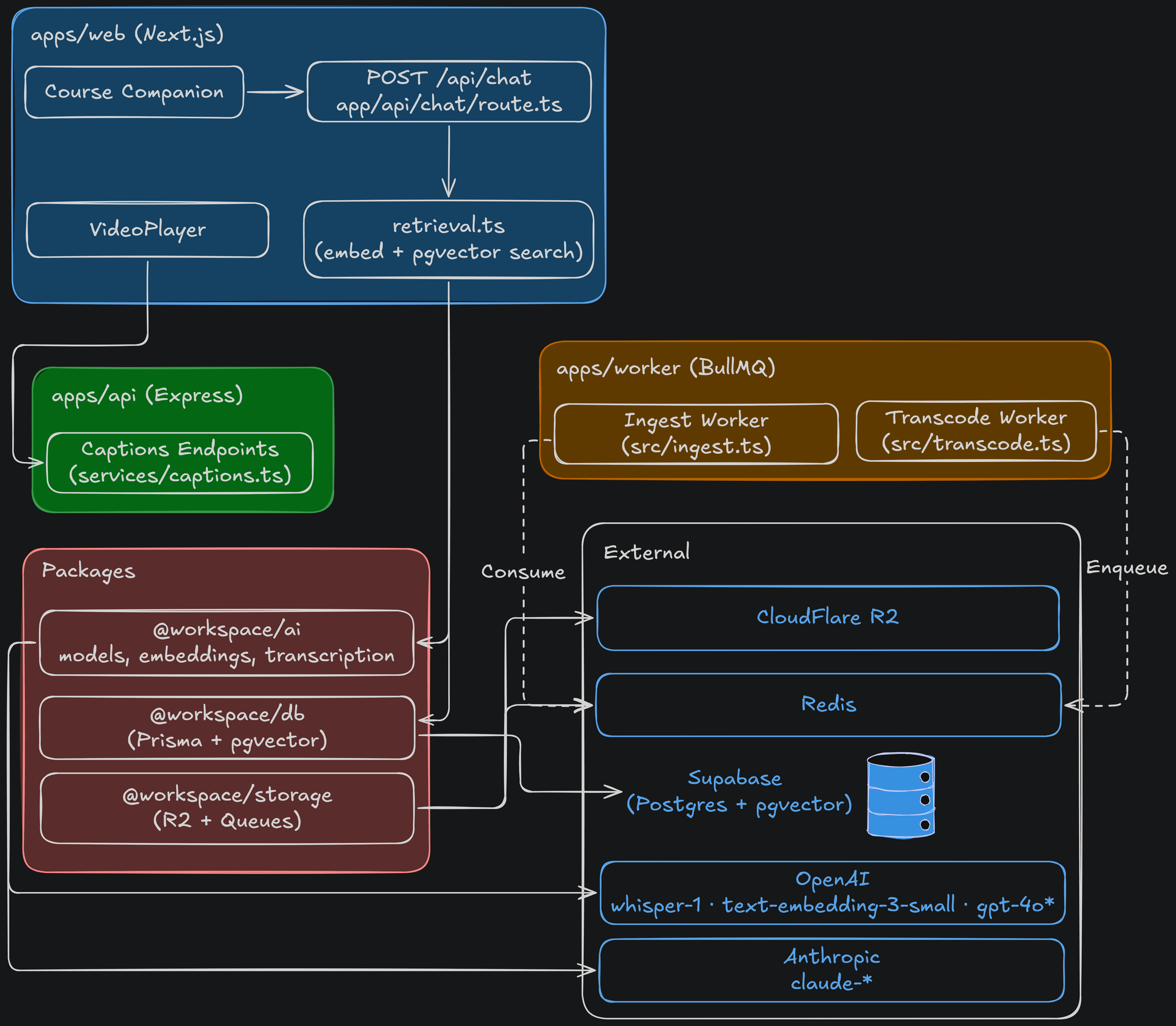
A monorepo splits into a Next.js web app (UI, chat endpoint, retrieval, companion widget, player), an Express API (captions and server concerns), and a worker running background jobs. Shared packages wrap the model providers, the database, and storage/queues. External services: OpenAI (chat, embeddings, transcription), Anthropic/Claude (chat), Cloudflare R2, Redis, and PostgreSQL + pgvector.
Video Pipeline
Uploading a raw video directly to the API server would be slow, block the request thread, and create a single point of failure. Instead, the flow looks like this:
- The client requests a presigned URL from the API
- The file uploads directly to Cloudflare R2 - the API server never touches the bytes
- A BullMQ job is enqueued and picked up by the worker
- The worker runs FFmpeg to transcode to HLS at multiple bitrates
- The processed files land back in R2, ready for adaptive streaming
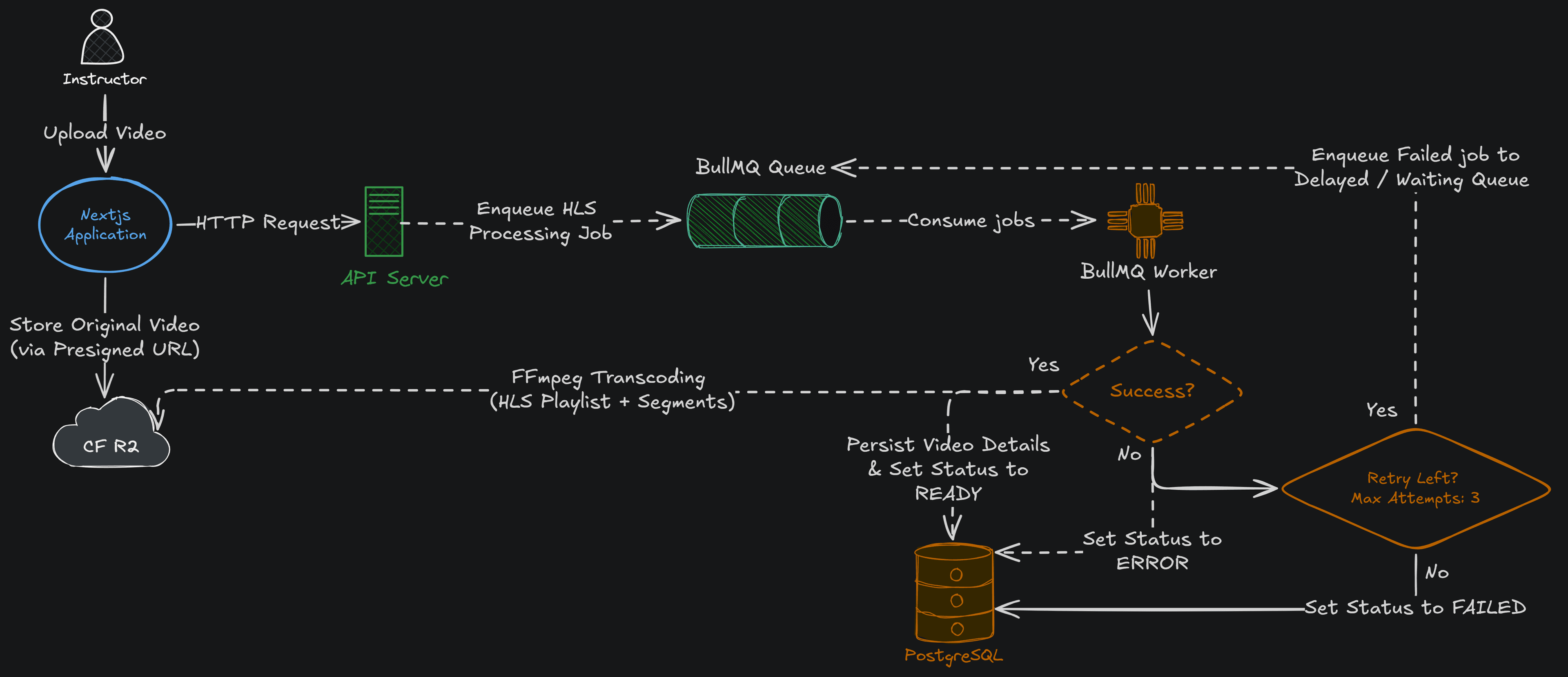
This keeps the API server fast, decouples processing from the request lifecycle, and makes the pipeline easy to scale independently.
Ingestion Pipeline
Every video also feeds the RAG layer. Transcription and embedding run on a separate BullMQ queue from video transcoding - so the I/O-bound RAG work scales independently of the CPU-bound transcode, and a backlog of one never starves the other. Re-running is idempotent per lesson.
video → Whisper transcription → chunking → pgvector embeddings (text-embedding-3-small)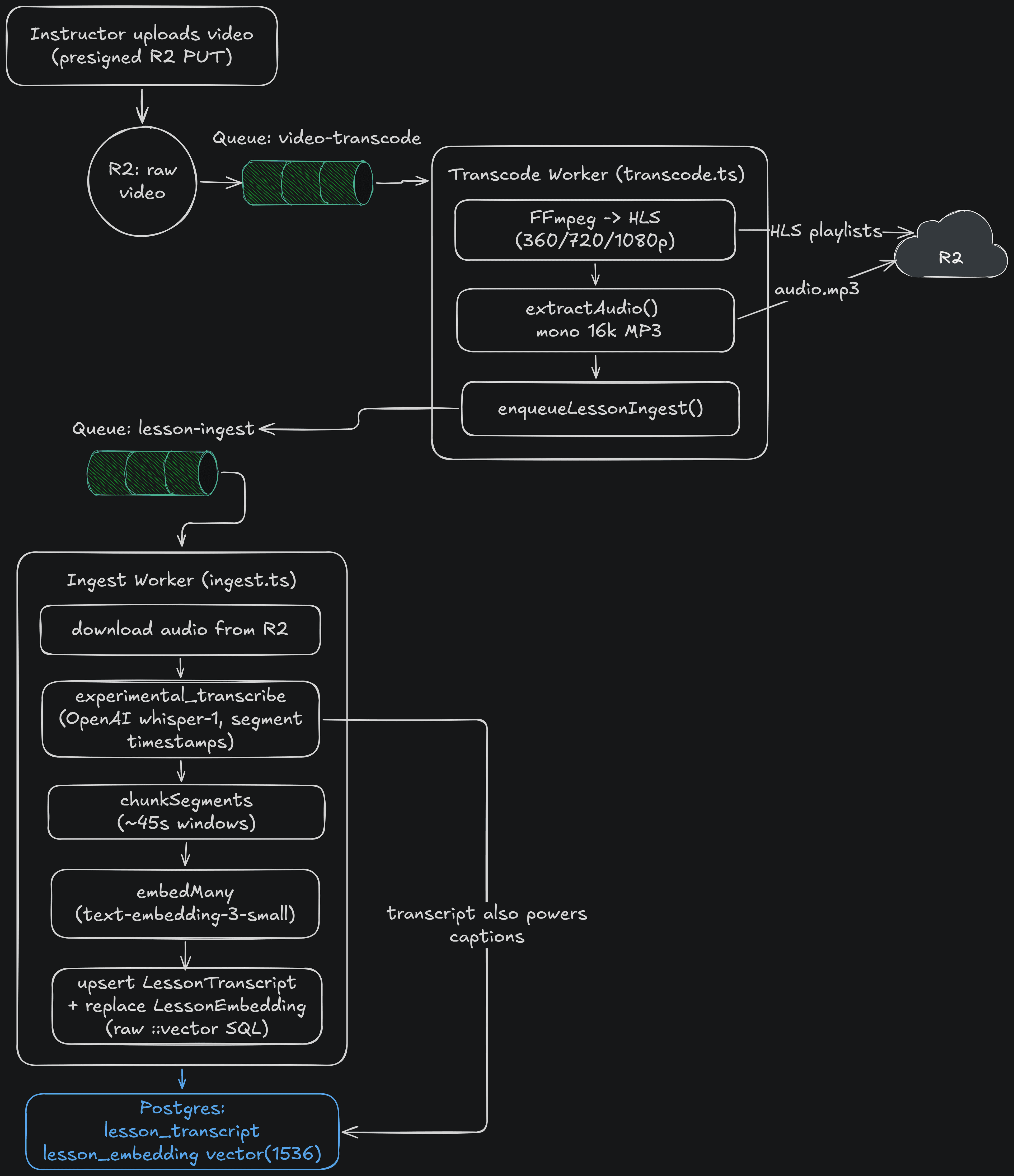
Grounded Chat Flow
A learner's question flows from the companion widget to POST /api/chat, which:
- Authenticates and gates on course enrollment (403 if not enrolled)
- Embeds the question (
text-embedding-3-small) - Runs a course-scoped pgvector similarity search (cosine, top-K)
- Builds context plus sources and streams a grounded answer from the selected OpenAI/Claude model
- Returns the retrieved chunks as message metadata, rendered as clickable citations
- On click, navigates with
?t=<timestamp>so the player seeks to that exact moment
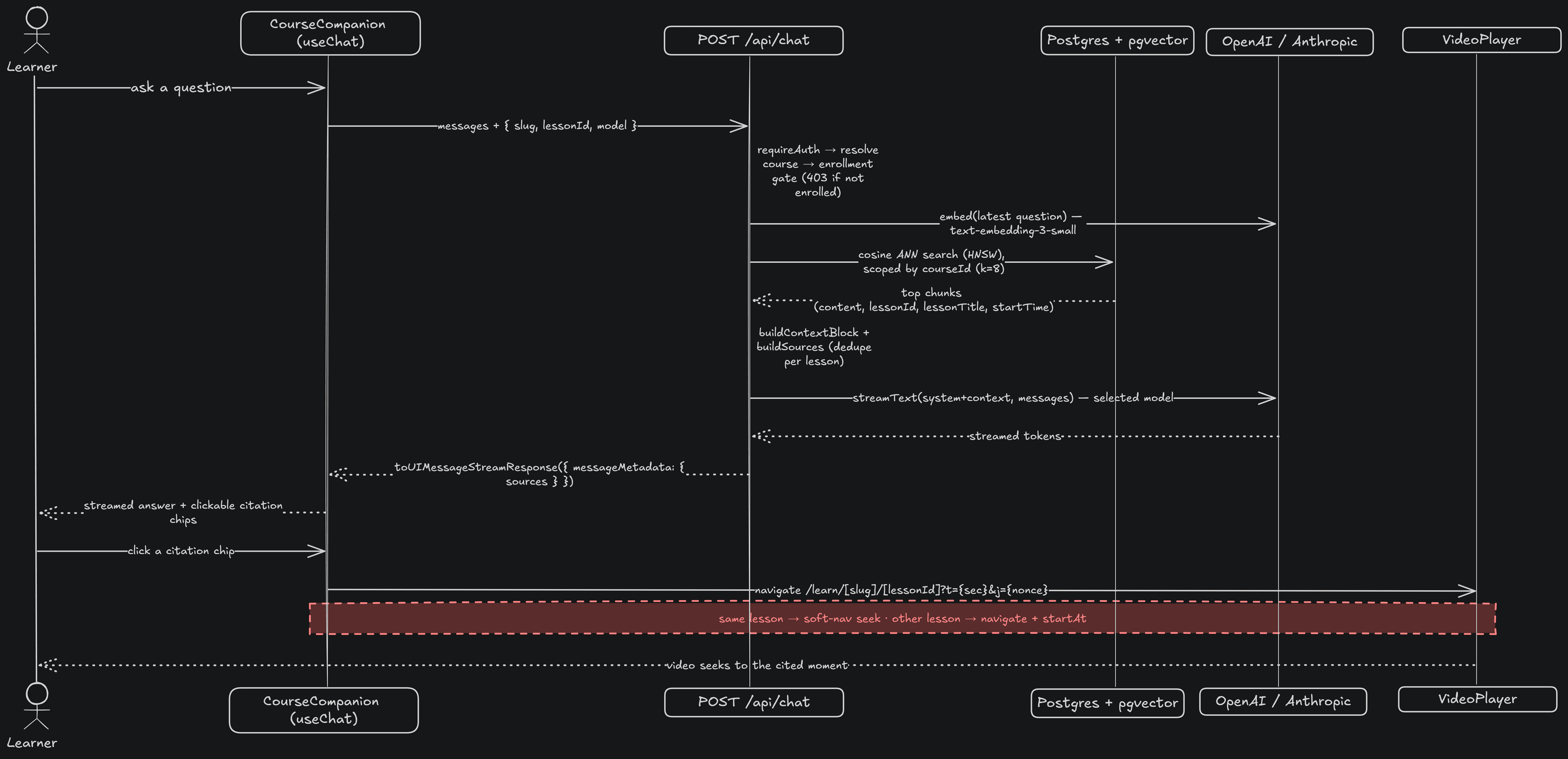
Zooming out, the companion's pieces - widget, chat endpoint, retrieval, embeddings, and model providers - map together like this:
Monorepo Organization
The codebase follows a Turborepo structure - 5 apps and 14 packages - with clear separation between applications and shared packages:
| Component | Responsibility |
|---|---|
| Web App | Next.js frontend - browsing, playback, enrollment, chat endpoint, retrieval, companion widget and more |
| API Server | Express REST API - auth, course management, payments, captions, certificates |
| Worker | Background job processing - video transcoding and RAG ingestion |
| React Email templates with hot-reload preview | |
| Studio | Prisma Studio for content and admin |
Shared packages - the AI layer, auth, contracts, database, storage, rate limiting, UI, logging, and utilities - live in packages/ and are consumed by whichever app needs them. The contracts package in particular is the handshake between the API and web app: shared request/response types that catch integration bugs at compile time rather than runtime.
Repository Layout
skillera/
├── apps/
│   ├── web/        # Next.js frontend
│   ├── api/        # Express API server
│   ├── email/      # React Email templates
│   ├── studio/     # Prisma Studio
│   └── worker/     # BullMQ job processor (transcode + RAG ingestion)
└── packages/
    ├── ai/         # model-provider wrappers (OpenAI/Claude behind one interface)
    ├── auth/
    ├── contracts/
    ├── db/         # Prisma + pgvector
    ├── email/
    ├── storage/    # R2 + queues
    ├── rate-limit/
    ├── ui/
    ├── logger/
    └── utils/
Production Considerations
Scalability
The worker is stateless and can be scaled horizontally - more instances just pull more jobs from the BullMQ queues. Separating the transcode and ingestion queues means CPU-bound and I/O-bound work scale on their own curves. Redis acts as the coordination layer, and Cloudflare R2 handles storage without capacity concerns.
Security
- Authentication - Sessions managed by Better Auth with encryption
- RBAC - Role-based access control across instructor, student, and admin roles
- Grounding as access control - the companion's retrieval is enrollment-gated and course-scoped in the same query, so it can't surface content a learner isn't entitled to
- Rate limiting - API endpoints protected against abuse via a shared
rate-limitpackage - SQL injection prevention - Prisma parameterizes all database queries
- Payment security - Razorpay handles PCI compliance; the application never touches raw payment details
How It Works
Course Publication Flow
Apply to teach - a user applies for instructor access; an admin approves the application
Instructor creates a course - adds metadata, sets pricing, and builds out lessons with video, text, quiz, or assignment content
Video upload - client requests a presigned R2 URL; file uploads directly to Cloudflare R2
Background processing - BullMQ workers transcode to HLS (360p/720p/1080p) and, on a separate queue, transcribe and embed the video for RAG and captions
Review and approval - course enters the review queue; an admin approves or returns change requests before it goes live
Enrollment - learner pays via Razorpay checkout; enrollment is created and a confirmation email is sent via Resend
Learn with the companion - learner watches lessons, takes AI-generated quizzes, and asks the grounded Course Companion questions answered from the course's own content
Certificate issuance - on course completion, a certificate is generated with a public verification URL
A course moves through this lifecycle - draft, review, change requests, and published - with admins gating the transitions:
Tech Stack
- Next.js 16 with TypeScript
- shadcn/ui + Tailwind CSS for components
- TanStack Query for server state management
- HLS.js for adaptive video playback with a custom player
- Better Auth for session management
Key Technical Decisions
Why a grounded RAG tutor instead of bolt-on chat? A generic LLM in a sidebar hallucinates and can't be trusted for learning. Skillera's companion retrieves from each course's own transcripts first, then answers - and surfaces the retrieved chunks as citations. The design puts more effort into retrieval than into model choice, because that's what makes answers provably sourced.
Why citations that seek the player?
Retrieved chunks carry timestamps as message metadata. Clicking a citation deep-links with ?t= and seeks the HLS.js player to that second. Instead of asking the learner to trust the AI, the answer points straight at the source - trust made visible.
Why two separate job queues? Video transcoding is CPU-bound; transcription and embedding are I/O-bound. Putting them on distinct BullMQ queues lets each scale independently, and a backlog of one never starves the other. Re-ingestion is idempotent per lesson, so reprocessing is safe.
Why a model-agnostic AI layer?
OpenAI and Claude both live behind a single @workspace/ai package and are selectable at request time. Swapping or adding a provider is a config change, not a refactor that ripples through the app.
Why presigned uploads instead of proxying through the API? Routing video files through an Express server adds latency, ties up request threads, and creates a scaling bottleneck. Presigned R2 URLs let the client upload directly to storage - the API just hands out the URL and moves on. The same pattern makes it easy to add upload size limits and expiry windows without touching the upload path.
Why HLS over a single video file? HLS lets the player switch quality levels based on available bandwidth - a learner on a slow connection gets 360p without buffering; on a fast one, they get 1080p. Serving a single file would force a quality choice upfront. Adaptive streaming makes the experience better without any user-facing complexity.
Why Better Auth over NextAuth? Better Auth gave more flexibility for mixing credential flows with role-based session logic, without fighting the library's assumptions at every step. The session model maps more cleanly to an application that has distinct instructor, student, and admin roles.
Challenges
Keeping the AI grounded and gated - the hard part of the companion wasn't wiring up a chat box; it was making sure it could only answer from content the learner is entitled to. Resolving grounding (course-scoped retrieval) and access control (enrollment gating) in the same query took careful schema and retrieval design, but it's what makes the feature trustworthy rather than a liability.
Getting video processing right - FFmpeg has a lot of surface area, and getting HLS output that plays correctly across browsers took iteration. The segmentation settings, codec choices, and manifest structure all matter. Running this as a background job rather than inline made it easier to test and retry without affecting the rest of the system.
Coupon scoping - the discount system needed to support coupons scoped to a specific course, a category, or the entire platform. Modelling that cleanly in the database without duplication required thinking carefully about the relationship between coupons, courses, and enrollments before writing any code.
What I Learned
Retrieval is where the work is, not the model. A grounded tutor lives or dies on what you put in the context window. Course-scoped, enrollment-gated retrieval did more for answer quality and trust than swapping between OpenAI and Claude ever did.
One AI feature can pay for another. Transcribing every video for RAG produced WebVTT closed captions as a byproduct - accessibility that fell out of an AI feature for free, with no extra pipeline.
Background jobs are infrastructure, not an afterthought. Treating the BullMQ worker as a first-class app in the monorepo - with its own config, logging, and retry policies - made both the video and ingestion pipelines far more debuggable than if they'd been bolted onto the API server.
Storage and compute should scale separately. Decoupling Cloudflare R2 (storage) from the worker (compute) means either can scale without affecting the other. That separation is easy to take for granted until you're running them together and hit a bottleneck.
Demo
A 14-minute end-to-end walkthrough - signing up, applying to teach, admin approval, building a course, the AI Course Companion answering in real time with seeking citations, certificates, and admin tooling.
Watch the walkthrough - Demo Video. The highlight is at 10:11, where the companion answers with a clickable citation that seeks the video.
Summary
Skillera is what you get when you take the features an LMS actually needs - a grounded AI tutor, video streaming, payments, certificates, background processing - and build them with the same care you'd give a production system. The goal wasn't to build something minimal; it was to build something complete, where every piece is legible and every tradeoff was made deliberately.
The patterns here - grounded retrieval with verifiable citations, presigned uploads, separated job queues, adaptive streaming, shared type contracts - aren't unique to an LMS. They show up anywhere you have user-generated media, async processing, AI grounded in your own data, and multiple surfaces that need to agree on the same data shapes.
Links
- GitHub Repository
- Demo Video
- build-elevate - the full-stack starter Skillera is built on